Apollo 13 Power Distribution
Apollo 13 Power Distribution
Final Project for ENEE140 - Intro to Programming Concepts for Engineers
Introduction
Introduction
The Apollo 13 movie portrays the intense and critical mission of three astronauts during the seventh manned mission of NASA's Apollo program. On April 11, 1970, an explosion in the Number 2 oxygen tank severely damaged the command module, cutting off vital supplies such as water, light, and electricity. The Command Module (in this project) only had 116Ah - or just ~150 minutes - worth of available energy that needed to be carefully distributed across four critical phases. Both the astronauts and Mission Control in Houston had to work together to find ways to conserve this limited power and ensure a safe return for the astronauts.
The Apollo 13 movie portrays the intense and critical mission of three astronauts during the seventh manned mission of NASA's Apollo program. On April 11, 1970, an explosion in the Number 2 oxygen tank severely damaged the command module, cutting off vital supplies such as water, light, and electricity. The Command Module (in this project) only had 116Ah - or just ~150 minutes - worth of available energy that needed to be carefully distributed across four critical phases. Both the astronauts and Mission Control in Houston had to work together to find ways to conserve this limited power and ensure a safe return for the astronauts.
Objective
Objective
Given total power capacity, total time, phases, and systems (also called tasks) with respective power draws, create a program to effectively distribute power to all necessary systems across four phases, and ensure the successful return of the astronauts.
Given total power capacity, total time, phases, and systems (also called tasks) with respective power draws, create a program to effectively distribute power to all necessary systems across four phases, and ensure the successful return of the astronauts.
Preplanning
Handling Power
Handling Power
The total power available for the Apollo 13 return mission was 116Ah, which was converted to 6960Amin. A portion of this power (26Ah or 1560Amin) was allocated to reserve for contingency, leaving 90Ah or (5400Amin) for operational use. The 90Ah allocation would then be suballocated across systems (tasks) within the four phases: Startup, Reentry, Landing, and Recovery Ops. By managing the power distribution between these phases, the astronauts and Mission Control were able to maximize the chances of a safe and successful return.
Converted 116Ah to 6960Amin
Reserve Power: 26Ah or 1560Amin
Usable Power: 90Ah or 5400Amin
Phases: Startup, Reentry, Landing, Recovery Ops
The total power available for the Apollo 13 return mission was 116Ah, which was converted to 6960Amin. A portion of this power (26Ah or 1560Amin) was allocated to reserve for contingency, leaving 90Ah or (5400Amin) for operational use. The 90Ah allocation would then be suballocated across systems (tasks) within the four phases: Startup, Reentry, Landing, and Recovery Ops. By managing the power distribution between these phases, the astronauts and Mission Control were able to maximize the chances of a safe and successful return.
Converted 116Ah to 6960Amin
Reserve Power: 26Ah or 1560Amin
Usable Power: 90Ah or 5400Amin
Phases: Startup, Reentry, Landing, Recovery Ops
Preplanning
Assigning Task Importance
Assigning Task Importance
Click to Expand
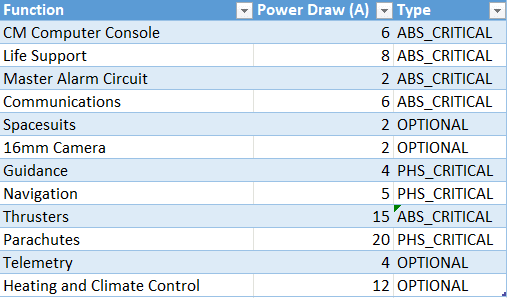
Shown above is a list of all the available tasks, along with their power draw and ranking. There are three categories of ranking: Absolute Critical (ABS_CRITICAL, ABSCRIT), Phase Critical (PHS_CRITICAL, PHSCRIT), and Optional (OPTIONAL, OPT). A task with 'ABS_CRITICAL' ranking is present in almost every phase and has the highest power priority (70% of usable power). A task with 'PHS_CRITICAL' ranking is present in specific phases and has the second highest power priority (25% of usable power). Finally, a task with 'OPTIONAL' ranking is not present in any phase by default has the lowest power priority (5% of usable power).
Shown above is a list of all the available tasks, along with their power draw and ranking. There are three categories of ranking: Absolute Critical (ABS_CRITICAL, ABSCRIT), Phase Critical (PHS_CRITICAL, PHSCRIT), and Optional (OPTIONAL, OPT). A task with 'ABS_CRITICAL' ranking is present in almost every phase and has the highest power priority (70% of usable power). A task with 'PHS_CRITICAL' ranking is present in specific phases and has the second highest power priority (25% of usable power). Finally, a task with 'OPTIONAL' ranking is not present in any phase by default has the lowest power priority (5% of usable power).
Preplanning
Assigning Tasks to Phases
Assigning Tasks to Phases
Click to Expand
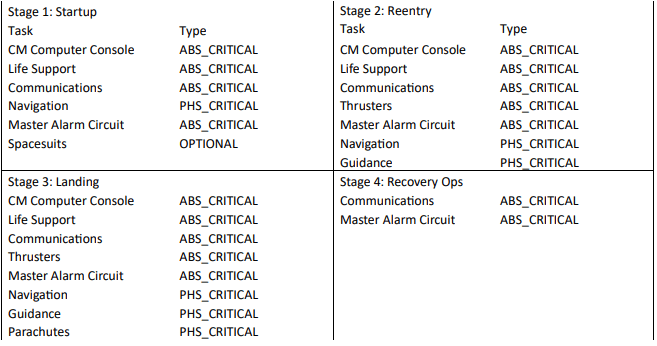
Shown above is the assignment of all the tasks into the four different phases. The Apollo 13 movie was helpful in determining which tasks to toggle in each phase. The 'Startup' phase means the CM module is just outside Earth's atmosphere, preparing for reentry. The 'Reentry' phase means the CM module is moving through Earth's atmosphere, battling intense heat from rapid air friction. The 'Landing' phase occurs right after passing through Earth's atmosphere, where the astronauts need to guide the CM module to the target landing location. Finally, the 'Recovery Ops' phase is the CM module broadcasting its location to help the military rescue the astronauts.
Shown above is the assignment of all the tasks into the four different phases. The Apollo 13 movie was helpful in determining which tasks to toggle in each phase. The 'Startup' phase means the CM module is just outside Earth's atmosphere, preparing for reentry. The 'Reentry' phase means the CM module is moving through Earth's atmosphere, battling intense heat from rapid air friction. The 'Landing' phase occurs right after passing through Earth's atmosphere, where the astronauts need to guide the CM module to the target landing location. Finally, the 'Recovery Ops' phase is the CM module broadcasting its location to help the military rescue the astronauts.
Visualizing the Algorithm
Visualizing the Algorithm
Click to Expand
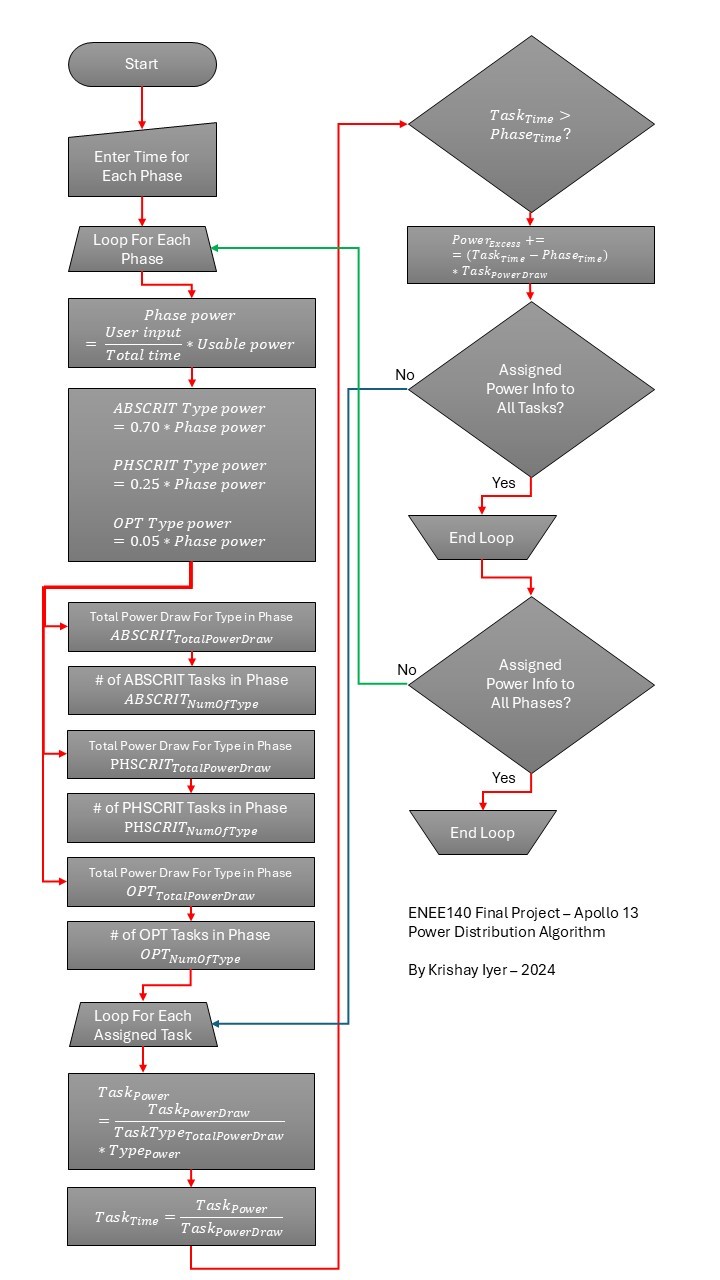
On startup, the program prompts the user to input the estimated time (in minutes) for each phase (phase time). Using this input, the algorithm iterates through each phase, calculating the power allocation based on the phase time divided by the total time, multiplied by the usable power capacity. For example, a Startup phase spanning 18 minutes would receive 648 Ampere-minutes of power given the previously mentioned parameters. Next, the algorithm determines allocations for Absolute Critical, Phase Critical, and Optional functions for each phase by applying the previously defined multipliers to the assigned power. The program then loads the default list of tasks for the specific phase, summing the total power draw for the ABSCRIT, PHSCRIT, and OPT ranks. The algorithm then iterates through each task, reads its ranking (ABSCRIT, PHSCRIT, or OPT), divides the task's power draw by the total power draw for its type, multiplying that value by the allocated power for the type. For example, the CM Computer Console task in the Startup phase has a ranking of Absolute Critical and has a power draw of 6A. The total power draw for ABSCRIT types in the Startup phase is 22A. Therefore, the power allocated for that task is ~ 123.7 Amin. After allocating power to the task, the algorithm will check if this allocation exceeds its required power for the phase duration. This is identified as excess power, which is then subtracted from the allocation, and stored for later use. The program repeats this process across all tasks and phases, ensuring efficient power distribution and completion of all steps.
On startup, the program prompts the user to input the estimated time (in minutes) for each phase (phase time). Using this input, the algorithm iterates through each phase, calculating the power allocation based on the phase time divided by the total time, multiplied by the usable power capacity. For example, a Startup phase spanning 18 minutes would receive 648 Ampere-minutes of power given the previously mentioned parameters. Next, the algorithm determines allocations for Absolute Critical, Phase Critical, and Optional functions for each phase by applying the previously defined multipliers to the assigned power. The program then loads the default list of tasks for the specific phase, summing the total power draw for the ABSCRIT, PHSCRIT, and OPT ranks. The algorithm then iterates through each task, reads its ranking (ABSCRIT, PHSCRIT, or OPT), divides the task's power draw by the total power draw for its type, multiplying that value by the allocated power for the type. For example, the CM Computer Console task in the Startup phase has a ranking of Absolute Critical and has a power draw of 6A. The total power draw for ABSCRIT types in the Startup phase is 22A. Therefore, the power allocated for that task is ~ 123.7 Amin. After allocating power to the task, the algorithm will check if this allocation exceeds its required power for the phase duration. This is identified as excess power, which is then subtracted from the allocation, and stored for later use. The program repeats this process across all tasks and phases, ensuring efficient power distribution and completion of all steps.
Demo of Algorithm
Demo of Algorithm
This is a demonstration of the algorithm in action. The program features a command-line interface that allows users to modify the power distribution configuration dynamically. Currently, the supported commands are 'add' and 'remove'. Future updates will introduce additional commands, such as 'phasetime', to adjust the time allocated to each phase, and 'reallocate', to distribute excess power to specific tasks or phases.
This is a demonstration of the algorithm in action. The program features a command-line interface that allows users to modify the power distribution configuration dynamically. Currently, the supported commands are 'add' and 'remove'. Future updates will introduce additional commands, such as 'phasetime', to adjust the time allocated to each phase, and 'reallocate', to distribute excess power to specific tasks or phases.
Printing Data to the Screen
Printing Data to the Screen
Click to Expand
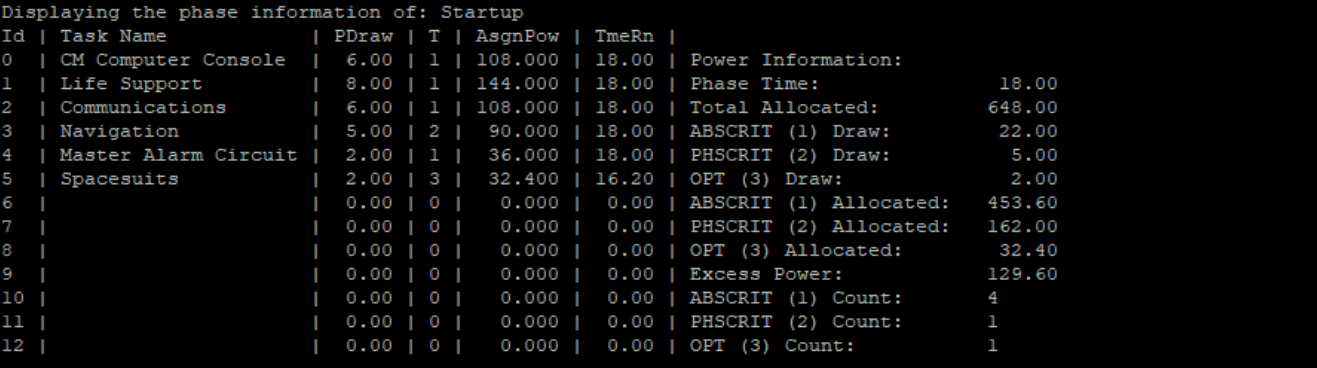
As demonstrated in the video, the algorithm efficiently displays tasks and their respective power allocations on the left, alongside phase power information on the right. Since C and many other programming languages print line-by-line, achieving this compact and organized display required interweaving different data elements. To accomplish this, the program first stores the data in temporary arrays. It then iterates through a 'for' loop to print task-specific details, power allocations, and corresponding phase information line by line. Advanced 'printf' statements, combined with dynamic word-length calculations, ensure proper alignment and readability. This approach results in a concise and visually elegant output that presents all necessary information effectively.
As demonstrated in the video, the algorithm efficiently displays tasks and their respective power allocations on the left, alongside phase power information on the right. Since C and many other programming languages print line-by-line, achieving this compact and organized display required interweaving different data elements. To accomplish this, the program first stores the data in temporary arrays. It then iterates through a 'for' loop to print task-specific details, power allocations, and corresponding phase information line by line. Advanced 'printf' statements, combined with dynamic word-length calculations, ensure proper alignment and readability. This approach results in a concise and visually elegant output that presents all necessary information effectively.
Conclusion
Conclusion
This project, spanning nearly 700 lines of code, is one of the largest I've done. I am glad to have showcased an advanced understanding of C. I greatly enjoyed ENEE140 - 'Intro to Programming Concepts for Engineers' and appreciated the opportunity to combine my interests in engineering and computer science. Given more time, I would improve the program further by adding command-line features like phase time adjustments, power reallocation, reserve management, and color highlighting for improved readability.
This project, spanning nearly 700 lines of code, is one of the largest I've done. I am glad to have showcased an advanced understanding of C. I greatly enjoyed ENEE140 - 'Intro to Programming Concepts for Engineers' and appreciated the opportunity to combine my interests in engineering and computer science. Given more time, I would improve the program further by adding command-line features like phase time adjustments, power reallocation, reserve management, and color highlighting for improved readability.